
What is a Knowledge Base?
A Knowledge Base is a repository of information that your AI agents use to retrieve accurate and relevant responses to user queries. This repository can include documents, FAQs, manuals, and other structured data. The system utilizes retrieval augmented generation (RAG), which extracts information from a vector database. Want to learn more? Check this article: HereEnhanced Accuracy
RAG significantly improves the accuracy of AI responses. By leveraging a knowledge
base, RAG allows AI models to access up-to-date, domain-specific information. This
reduces hallucinations (made-up information) and ensures responses are grounded in
factual data. For businesses, this means more reliable customer interactions and
reduced risk of misinformation.
Customizable Knowledge
Knowledge bases offer tailored, organization-specific information. Unlike general AI
models, a knowledge base can be customized with your company’s unique data, policies,
and procedures. This allows our AI agents to provide responses that are perfectly
aligned with your brand voice and specific business context, enhancing customer
experience and reducing the need for human intervention in customer service.
What is a RAG System?
RAG (Retrieval Augmented Generation) combines two powerful components that ensure your agents deliver highly accurate and contextually relevant responses:Retrieval
Searches the Knowledge Base to find relevant information.
Augmented Generation
Uses the retrieved information to generate precise and contextually accurate responses
using one of the LLMs available in Convocore.
Example RAG Architecture
Example RAG Architecture

1
User Query
The process begins when a user submits a question or request.
2
Retrieval
The system searches the Knowledge Base for relevant information related to the query.
3
Augmentation
Retrieved information is used to augment the context provided to the LLM.
4
Generation
The LLM generates a response based on the augmented context and its training.
5
Response
A contextually relevant and accurate answer is provided to the user.
By leveraging both stored knowledge and the generative capabilities of LLMs, RAG systems
provide more accurate, up-to-date, and contextually appropriate responses compared to
using LLMs alone.
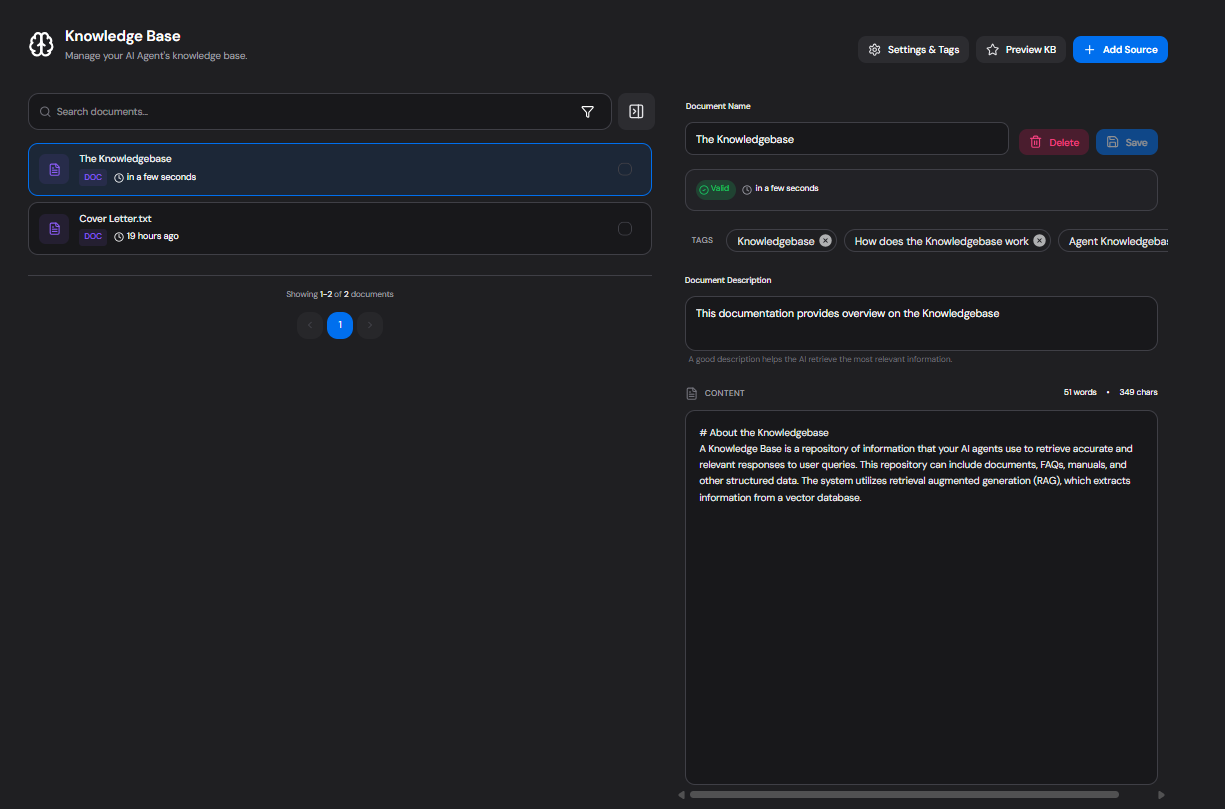
The knoweldge base interface in Convocore
Document version history
Knowledge base documents now include a built-inHistory view directly inside the document editor.
Use it to:
- Review the last saved versions of a KB document
- See when a version was saved
- Restore an older version back into the editor
- Identify who changed the document when actor details are available
Version history works for both Convocore/VG agents and Voiceflow/VF agents. History starts building from the point a document is saved with the feature enabled, so older documents may not have earlier revisions recorded.