
🛠 Voice System Workflow
The Voice Suite operates in a series of interconnected steps:1. User Speech Input 🎤
The process begins when a user speaks:- Voice input is captured in real-time using your application’s front-end (e.g., a web app or mobile app).
- The input is sent to a transcriber service (e.g., Deepgram) for processing.
2. Speech Transcription 📝
- The transcriber converts the audio into text.
- Parameters like Patience Factor allow you to customize how quickly the system finalizes the transcription.
Example:
If a user pauses frequently, the Patience Factor determines whether the system waits for them to finish speaking or processes the response immediately.
3. Text-to-Speech Generation 🔊
Once transcription is complete:- The text is passed to the Speech Generation Service (e.g., ElevenLabs) to produce audio responses.
- You can configure:
- Voice ID: Select different tones, accents, or speaker profiles.
- Background Noise: Simulate environments like Restaurants or Offices for a more lifelike experience.
4. Voice Response Playback ⏯
The generated audio is sent back to the user’s device and played in real-time.Example Scenario:
- User: “What time is my appointment?”
- System: “Your appointment is scheduled for 3 PM today.”
5. Phone Integration (Optional) 📞
- With Twilio Integration, you can enable voice calling to allow real-time phone interactions.
- Use purchased numbers or connect your existing Twilio account.
🔄 End-to-End Flow Diagram
Here’s a visual breakdown of the entire workflow: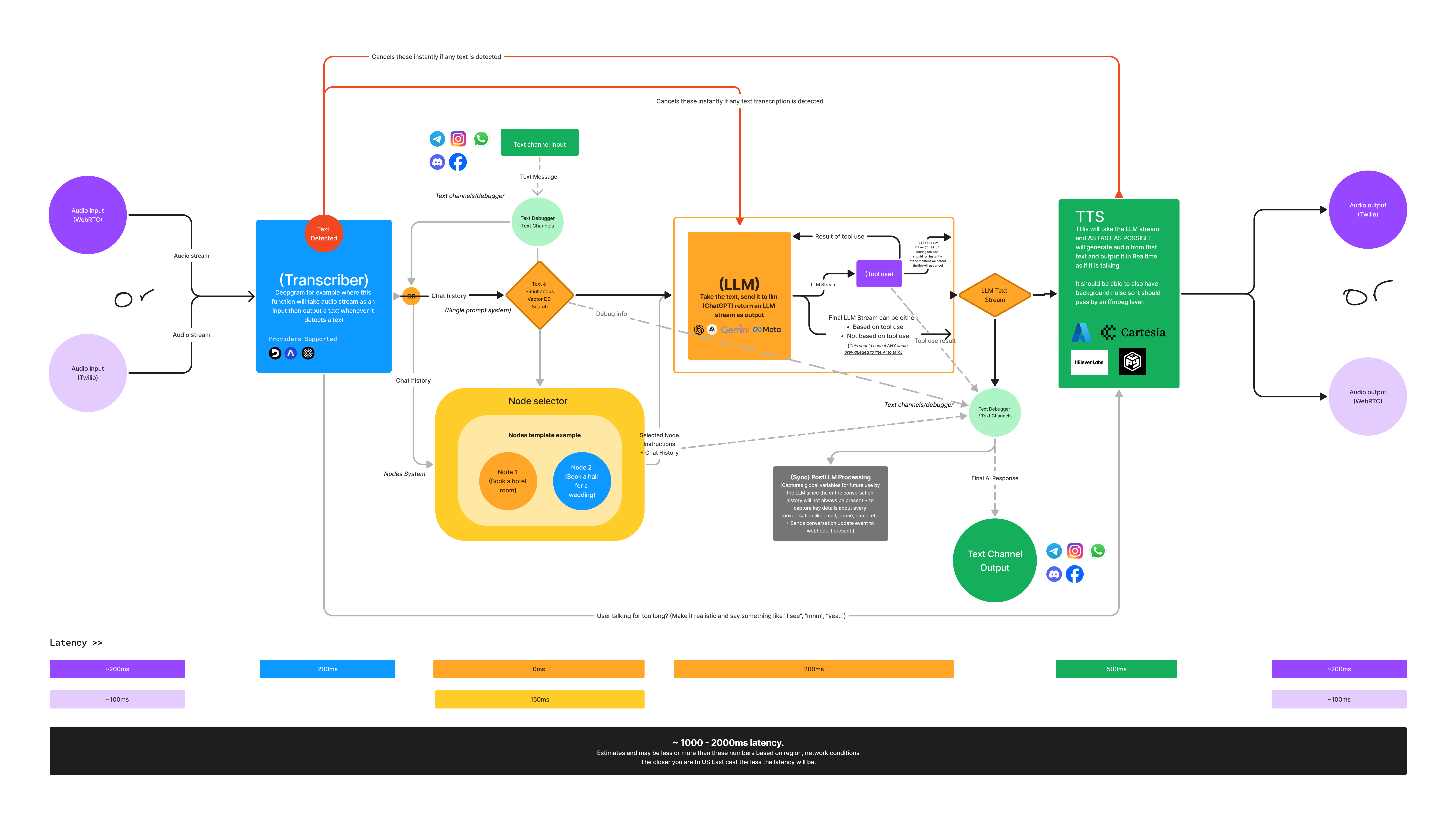
💡 Key Components
🚦 Technical Summary
- Latency: Designed for minimal delay to ensure smooth user interactions.
- Providers: Integrates seamlessly with third-party APIs like Deepgram, ElevenLabs, and Twilio.
- Flexibility: Configure settings at multiple levels, from speech patience to voice tone.
🔗 Next Steps
Now that you understand how Voice works, explore the following guides to set up and configure it for your app:- Setup Guide - Step-by-step Twilio and Web Calling integration.
- Configuration Settings - Customize transcription and speech generation.
- Advanced Settings - Explore advanced controls like recording and routing.
🛠 Troubleshooting
-
Delayed Responses?
- Adjust the Patience Factor to improve real-time behavior.
-
Low-Quality Audio?
- Configure the Voice ID in your Speech Generation settings.
-
Twilio Setup Issues?
- Double-check Twilio credentials and webhook URLs.
With this understanding, you’re ready to implement Voice in your application and create seamless voice-driven user experiences! 🚀