
- Import or organize leads
- Group them
- Create a campaign that targets that group
- Monitor progress, metrics, and outcomes
What campaigns are for
Common campaign use cases include:- Outbound sales follow-up
- Lead qualification
- Appointment reminders
- Re-engagement of inactive contacts
- Voice-based customer outreach
Campaign types
At a high level, Convocore supports campaign-style outreach for:- Voice campaigns: automated outbound calling to a lead group
- WhatsApp template campaigns: template-based outreach for WhatsApp use cases where supported in your workflow
Before you create a campaign
You need a lead group first.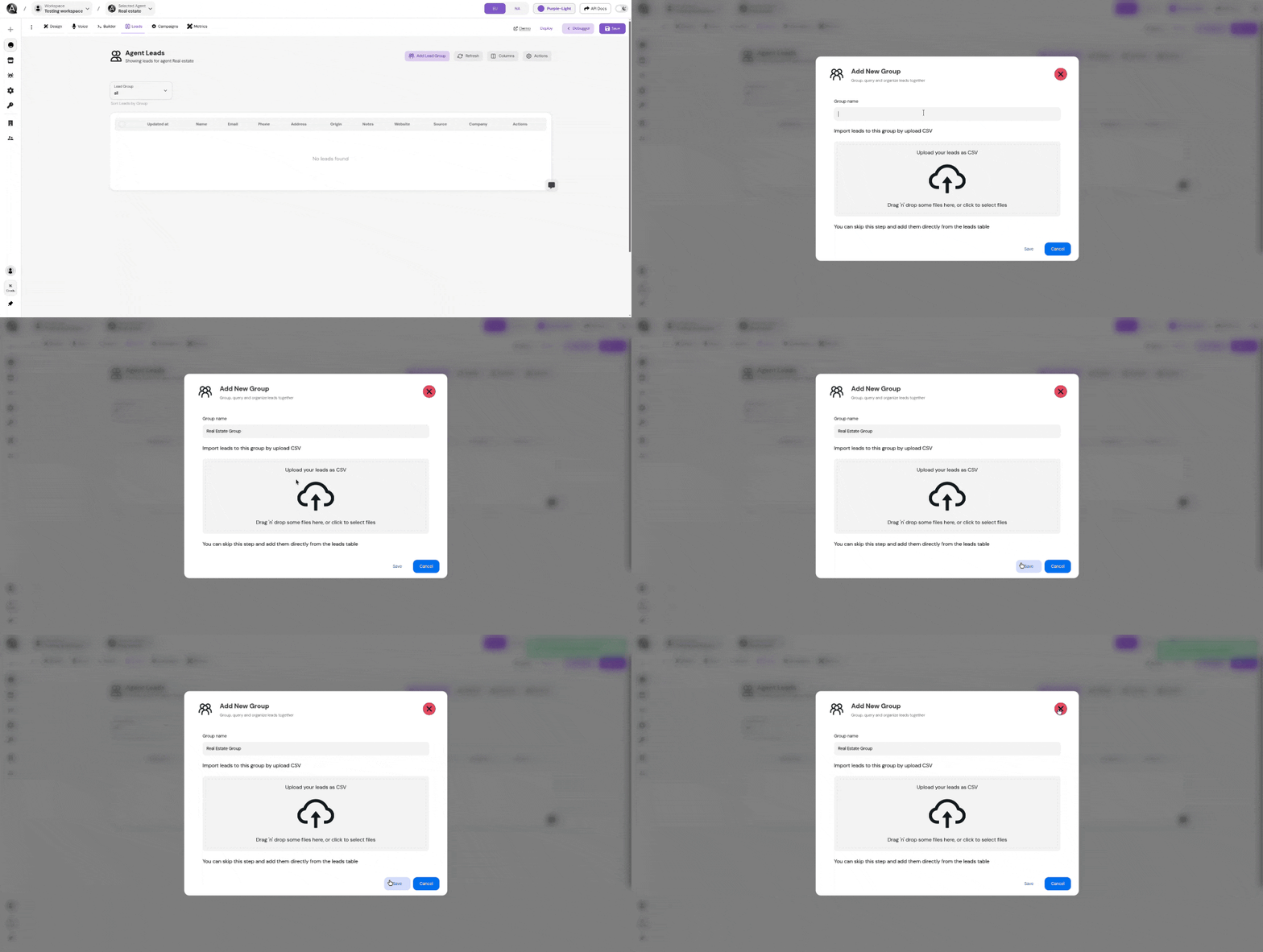
1
Open the leads area
Go to your agent dashboard and open the section where your leads are managed.
2
Create or import leads
Add leads manually or import them in bulk using a CSV file.
3
Assign a lead group
Group leads under a shared name so the campaign can target them together.
Create a campaign
1
Open the Campaigns tab
Go to your agent dashboard and open the
Campaigns tab.2
Create a new campaign
Click
Create Campaign.3
Choose the basics
Set the campaign name and select the lead group you want to target.
4
Configure execution
Define concurrency, delay between calls, and other runtime controls.
5
Set prompts and post-call behavior
Define how the outreach starts and what should be analyzed after each call.
6
Save and launch
Save the campaign, then run, pause, or stop it from the campaigns table.
Core campaign settings
Target lead group
This determines which leads are included in the campaign.Concurrency slots
Controls how many outbound calls the campaign is allowed to process at the same time.Delay between calls
Adds spacing between outbound attempts to help you control pacing.Initial prompt
Defines the opening message or first instruction used when the call begins.Call analysis summary prompt
Defines what the system should evaluate after the call ends, such as outcome classification, notes, or follow-up quality.Post-call metrics
You can attach metrics to measure campaign outcomes. Depending on your setup, these can be:- Built-in metrics
- Custom metrics configured in the platform
Scheduling and timing
Campaigns can be restricted to a working schedule so outreach happens only during allowed hours.- Open time / close time: Set the daily window when the campaign may run
- Timezone: Choose the timezone that the schedule should follow
- Working days: Limit the campaign to selected days of the week
Managing campaigns
From the campaigns table you can usually:- Start a campaign
- Pause or stop a campaign
- Edit campaign settings
- Review status and progress
- Remove a campaign you no longer need
Best practices
Start with a clean lead group
Use clear grouping so you always know exactly who a campaign is targeting.
Keep prompts specific
Strong opening prompts and post-call summaries make campaign results much easier to review.
Use scheduling
Limit outreach to appropriate business hours for the audience you are contacting.
Track outcomes
Attach useful metrics so you can compare campaigns and optimize what works.