
Key Parameters in Models Configuration
1. Temperature
The Temperature parameter controls the creativity of the chatbot’s responses:- Lower Values (0–0.3): Generate precise, fact-based, and deterministic answers.
- Higher Values (0.7–1.0): Produce creative, varied, and open-ended responses.
- Customer Support: Set the temperature to
0.2for factual and consistent responses. - Creative Tasks: Set the temperature to
0.8for generating innovative ideas or content.
2. Max Tokens
The Max Tokens parameter limits the length of the chatbot’s response.- A higher token limit allows for detailed answers.
- A lower token limit ensures concise and to-the-point responses.
- Summaries: Limit tokens to
100for short summaries. - Detailed Explanations: Increase the limit to
500for in-depth explanations.
3. Rewind Level
The Rewind Level determines how far back the chatbot can reference previous nodes in the flow:- Level 0: No rewind, the chatbot only considers the current node.
- Level 1–3: The chatbot can reference up to 3 previous nodes for additional context.
- Error Handling: Set the rewind level to
1to retry failed actions. - Complex Conversations: Use rewind levels of
2–3for maintaining context across multiple nodes.
Configuring Models in the Node Settings
- Open the LLM Configuration tab in a node’s settings.
-
Adjust the following parameters:
- Temperature: Slide the control to the desired level.
- Max Tokens: Set a specific token limit for responses.
- Rewind Level: Choose the rewind level for managing conversation context.
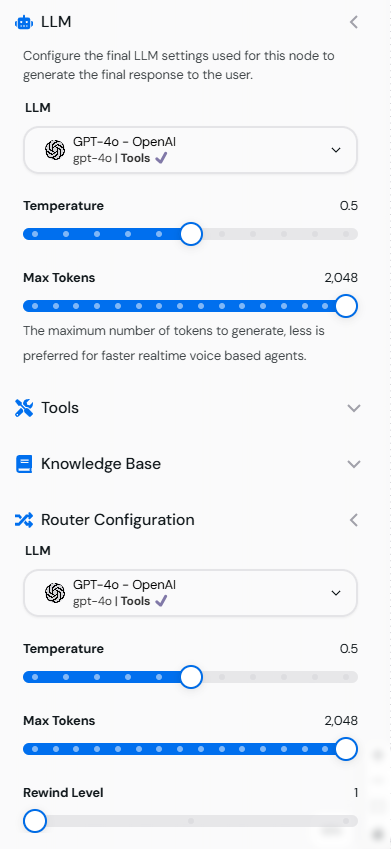
Image showing the LLM Configuration tab with Temperature, Max Tokens, and Rewind Level settings.
Example Configurations
1. Precise and Factual Responses
- Temperature:
0.1 - Max Tokens:
200 - Rewind Level:
0
2. Creative and Open-Ended Responses
- Temperature:
0.9 - Max Tokens:
500 - Rewind Level:
2
3. Contextual Conversations
- Temperature:
0.3 - Max Tokens:
300 - Rewind Level:
3
Testing Model Settings
- Use the Test Tool in the Canvas Workspace to simulate responses.
- Input queries matching your intended use case.
- Adjust the parameters as needed for better results.
Best Practices for Models Configuration
- Align Parameters with Use Cases: Tailor Temperature and Max Tokens to the specific requirements of your chatbot.
- Test Iteratively: Run multiple tests to fine-tune the settings.
- Balance Creativity and Precision: Use mid-range Temperature values (
0.4–0.6) for responses that are both creative and accurate. - Leverage Rewind Levels: Enable context retention for better user interactions.
Example Flow with Configured Models
Scenario: A multi-purpose chatbot:- Start Node: Welcomes the user with a creative tone (Temperature
0.7). - FAQ Node: Provides precise answers with a factual tone (Temperature
0.2). - Feedback Node: Asks for user feedback with an engaging tone (Temperature
0.5).