> ## Documentation Index
> Fetch the complete documentation index at: https://docs.convocore.ai/llms.txt
> Use this file to discover all available pages before exploring further.
# Billing FAQs
> Answers to common questions about billing and credits for agency owners and their clients.
Get answers to the most common questions about billing and credits in Convocore. This guide explains pricing, transactions, and how to manage billing effectively.
All financial transactions are securely processed via Stripe. Convocore
does not store credit card information.
***
## Frequently Asked Questions
### 1. **How is the credit price calculated?**
The final credit price combines the agency owner’s set price with our base price. For example:
* Agency Owner Price: `$0.004`
* Convocore Base Price: `$0.002`
* **Final Price**: `$0.006`
### 2. **What happens when a customer makes a payment?**
When a customer pays for credits:
1. Convocore deducts the **base credit price** for each purchased credit.
2. A **5% service fee** is applied to the agency owner’s margin.
Example: If your margin per credit is `$0.004`, we will take `5%` of `$0.004`,
resulting in a `0.0002` fee per credit.
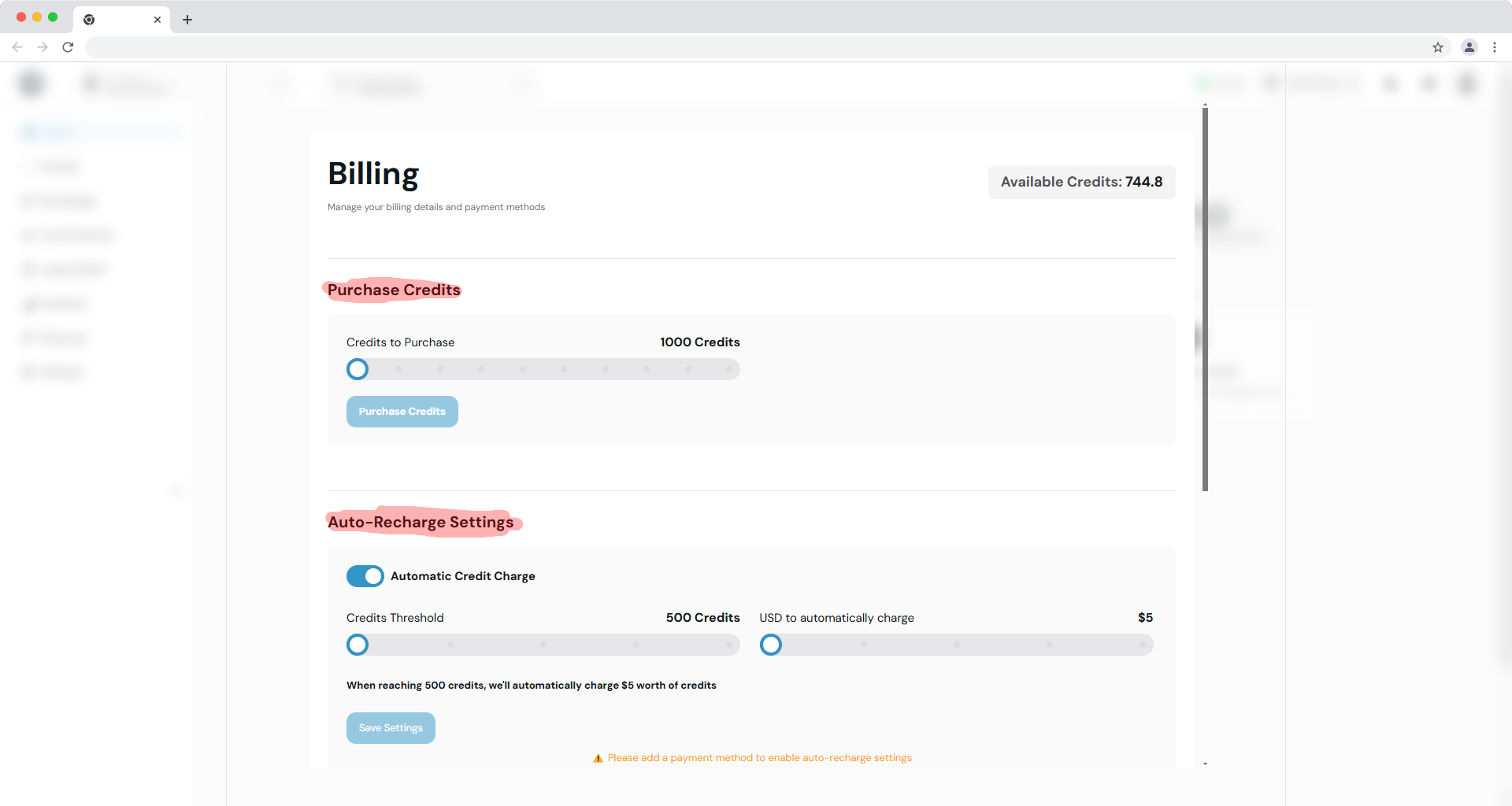
### 3. **Can customers set up automatic charges?**
Yes! Customers can enable **Auto Charge**, which allows them to set a credit threshold. When their credits drop below this threshold, their account is automatically charged the amount they predefined.
### 4. **Can customers buy prepaid credits?**
Absolutely. Customers can purchase predefined credit packages:
* **1000 credits**
* **2000 credits**
* **3000 credits**
* **4000 credits**
* **Up to 10000 credits**
 ### 5. **How are credits consumed by agents?**
Once billing is enabled for an organization:
* All agents assigned to the organization will consume **org credits** instead of workspace credits.
* When the organization’s credits reach **0**, agents will stop functioning until credits are recharged.
Agency owners can monitor credit consumption and transfer credits if needed.
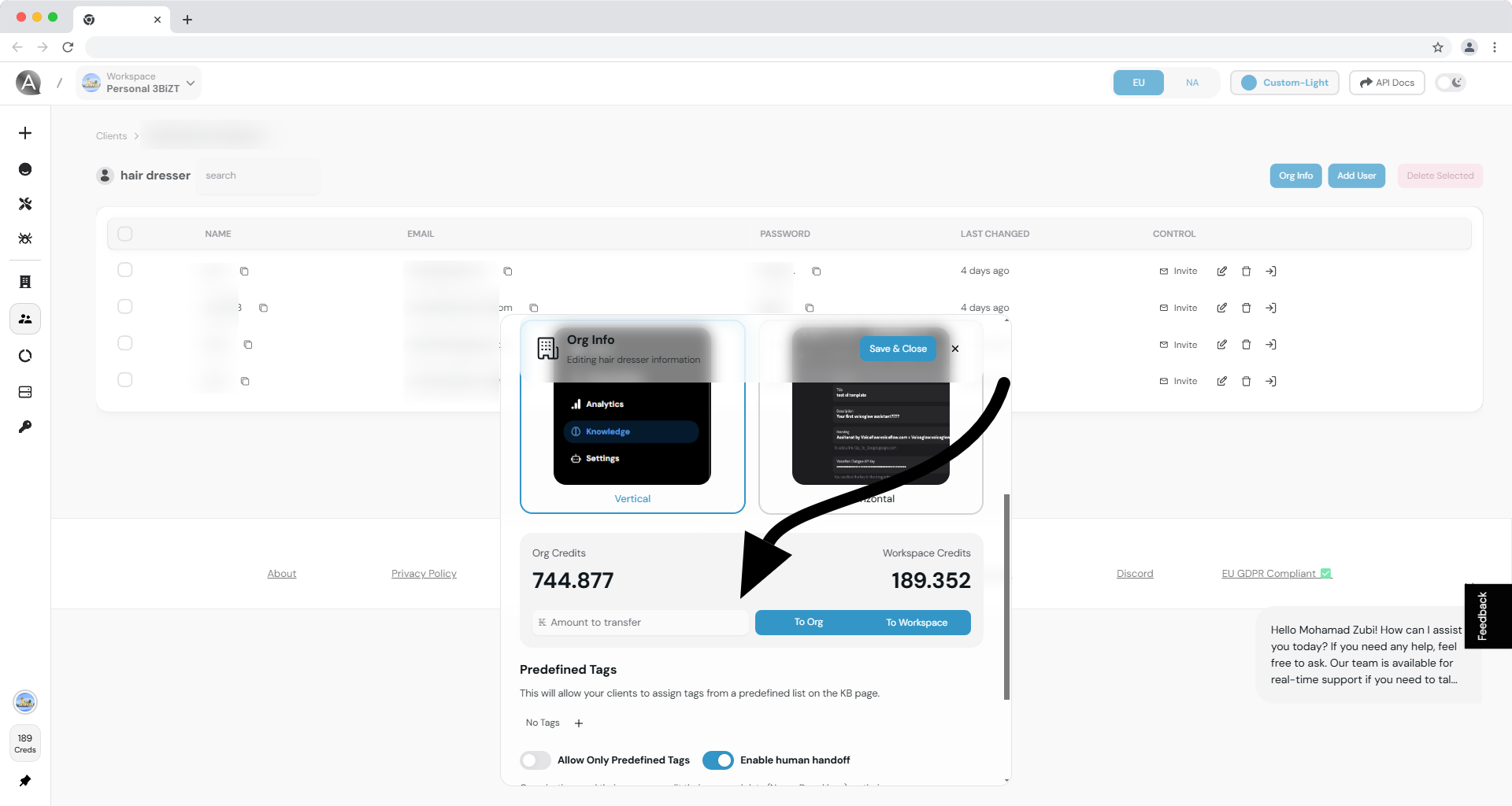
### 6. **Can agency owners transfer credits?**
Yes, agency owners can transfer credits between:
* **Workspace → Organization**
* **Organization → Workspace**
This is managed through the **Org Info** section or **Credit Transfer** tool.
### 5. **How are credits consumed by agents?**
Once billing is enabled for an organization:
* All agents assigned to the organization will consume **org credits** instead of workspace credits.
* When the organization’s credits reach **0**, agents will stop functioning until credits are recharged.
Agency owners can monitor credit consumption and transfer credits if needed.
### 6. **Can agency owners transfer credits?**
Yes, agency owners can transfer credits between:
* **Workspace → Organization**
* **Organization → Workspace**
This is managed through the **Org Info** section or **Credit Transfer** tool.
 ### 7. **How can agency owners manage billing permissions?**
Agency owners can grant billing access to specific users in the organization:
1. Click **Edit User** for the user.
2. In the modal, enable the **Billing** permission.
Only users with the **Billing** permission can manage the organization's
financial operations.
### 8. **What is Convocore's service fee?**
Convocore charges a **5% fee** on the agency owner’s margin after deducting the base credit price.
This fee ensures a seamless billing experience with secure transactions and
full Stripe integration.
### 9. **How are payouts handled?**
Payouts are processed directly to the agency owner’s connected **Stripe account**. Ensure your Stripe account is properly configured to receive payouts without delays.
### 10. **Does Convocore save credit card information?**
No, Convocore does not save any credit card details. All payment information is securely handled by **Stripe**.
***
## Related Documentation
Learn how to connect your Stripe account for billing functionality.
Step-by-step guide to enable billing for client organizations.
### 7. **How can agency owners manage billing permissions?**
Agency owners can grant billing access to specific users in the organization:
1. Click **Edit User** for the user.
2. In the modal, enable the **Billing** permission.
Only users with the **Billing** permission can manage the organization's
financial operations.
### 8. **What is Convocore's service fee?**
Convocore charges a **5% fee** on the agency owner’s margin after deducting the base credit price.
This fee ensures a seamless billing experience with secure transactions and
full Stripe integration.
### 9. **How are payouts handled?**
Payouts are processed directly to the agency owner’s connected **Stripe account**. Ensure your Stripe account is properly configured to receive payouts without delays.
### 10. **Does Convocore save credit card information?**
No, Convocore does not save any credit card details. All payment information is securely handled by **Stripe**.
***
## Related Documentation
Learn how to connect your Stripe account for billing functionality.
Step-by-step guide to enable billing for client organizations.