> ## Documentation Index
> Fetch the complete documentation index at: https://docs.convocore.ai/llms.txt
> Use this file to discover all available pages before exploring further.
# Configure Agency Footer
The footer section of your agency dashboard plays a crucial role in providing essential information and links to your clients. Customizing this area helps reinforce your brand and ensures clients have easy access to important resources.
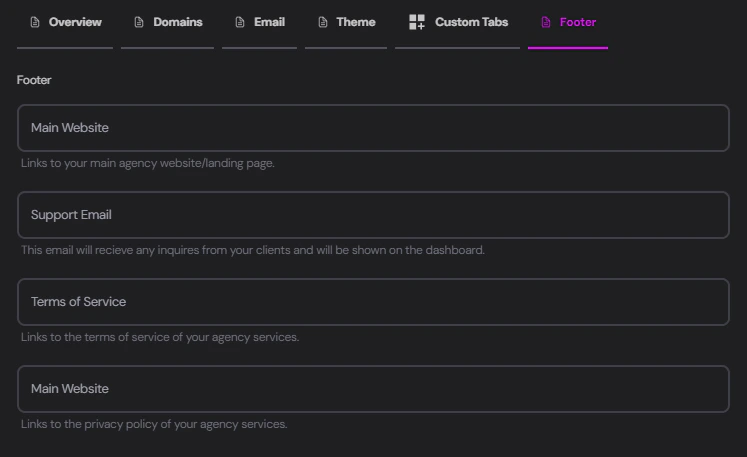 ## Footer Customization Options
Navigate to the Footer tab in your agency settings to configure the following elements:
```plaintext theme={null}
Field: Main Website
Description: Links to your main agency website/landing page.
```
Input the URL of your agency's primary website or landing page. This provides a direct link for clients to learn more about your services.
```plaintext theme={null}
Field: Support Email
Description: This email will receive any inquiries from your clients and will be shown on the dashboard.
```
Enter the email address dedicated to client support. This email will be displayed on the dashboard and serve as the primary contact point for client inquiries.
```plaintext theme={null}
Field: Terms of Service
Description: Links to the terms of service of your agency services.
```
Provide the URL to your agency's terms of service document. This ensures clients have easy access to important legal information regarding your services.
```plaintext theme={null}
Field: Privacy Policy
Description: Links to the privacy policy of your agency services.
```
Input the URL to your agency's privacy policy. This helps maintain transparency and compliance with data protection regulations.
Ensure all URLs are valid and up-to-date. Consider using your custom domain for these links to maintain brand consistency.
## Best Practices
To make the most of your agency footer:
Regularly review and update the links and email addresses to ensure they remain accurate.
Use URLs that reflect your agency's branding, preferably on your custom domain.
Ensure that linked documents (Terms of Service, Privacy Policy) are easily readable and accessible.
Consider including support hours or response time expectations alongside the support email.
**Remember:** The footer appears across all pages of your client dashboard.
## Footer Customization Options
Navigate to the Footer tab in your agency settings to configure the following elements:
```plaintext theme={null}
Field: Main Website
Description: Links to your main agency website/landing page.
```
Input the URL of your agency's primary website or landing page. This provides a direct link for clients to learn more about your services.
```plaintext theme={null}
Field: Support Email
Description: This email will receive any inquiries from your clients and will be shown on the dashboard.
```
Enter the email address dedicated to client support. This email will be displayed on the dashboard and serve as the primary contact point for client inquiries.
```plaintext theme={null}
Field: Terms of Service
Description: Links to the terms of service of your agency services.
```
Provide the URL to your agency's terms of service document. This ensures clients have easy access to important legal information regarding your services.
```plaintext theme={null}
Field: Privacy Policy
Description: Links to the privacy policy of your agency services.
```
Input the URL to your agency's privacy policy. This helps maintain transparency and compliance with data protection regulations.
Ensure all URLs are valid and up-to-date. Consider using your custom domain for these links to maintain brand consistency.
## Best Practices
To make the most of your agency footer:
Regularly review and update the links and email addresses to ensure they remain accurate.
Use URLs that reflect your agency's branding, preferably on your custom domain.
Ensure that linked documents (Terms of Service, Privacy Policy) are easily readable and accessible.
Consider including support hours or response time expectations alongside the support email.
**Remember:** The footer appears across all pages of your client dashboard.