> ## Documentation Index
> Fetch the complete documentation index at: https://docs.convocore.ai/llms.txt
> Use this file to discover all available pages before exploring further.
# Iframe
> Explore the versatile applications of iframes for Convocore AI agents
Iframes introduce a whole new range of use cases for Convocore agent, allowing for seamless integration into various platforms and websites. This method offers flexibility and reduces potential conflicts with existing scripts or stylesheets.
## Why Use Iframes?
Easily integrate your agent into various platforms and websites.
Minimize potential conflicts with existing scripts or stylesheets.
Tailor the agent's appearance and behavior to fit specific use cases.
Quickly deploy your agent via URL or embed code.
## Popular Use Cases
Make your agent available within your own platform or third-party services like PowerBI, Slack, Teams, or Monday.com.
Consider the specific requirements and limitations of each platform when integrating your agent.
Offer your Convocore Agent as a value-added feature in your SaaS platform.
This approach allows for various monetization strategies, such as monthly retainer fees or custom setups with credit-based subscription models.
Learn more about turning your agent into a branded client-facing offer with Convocore's embeddable pricing flow.
Integrate the agent directly into your website's layout for a unique user experience.
Embed the agent on your front page for immediate user engagement.
Replace traditional FAQ pages with an AI-powered, interactive experience.
{" "}
Use the iframe's source URL to easily share your agent via email, chat, or as
a linked button on your website.
## Implementation Guide
**To integrate your Convocore Agent using an iframe, follow these steps:**
1. Log in to your Convocore Dashboard
2. Navigate to your agent and click on `Deploy` in the upper right.
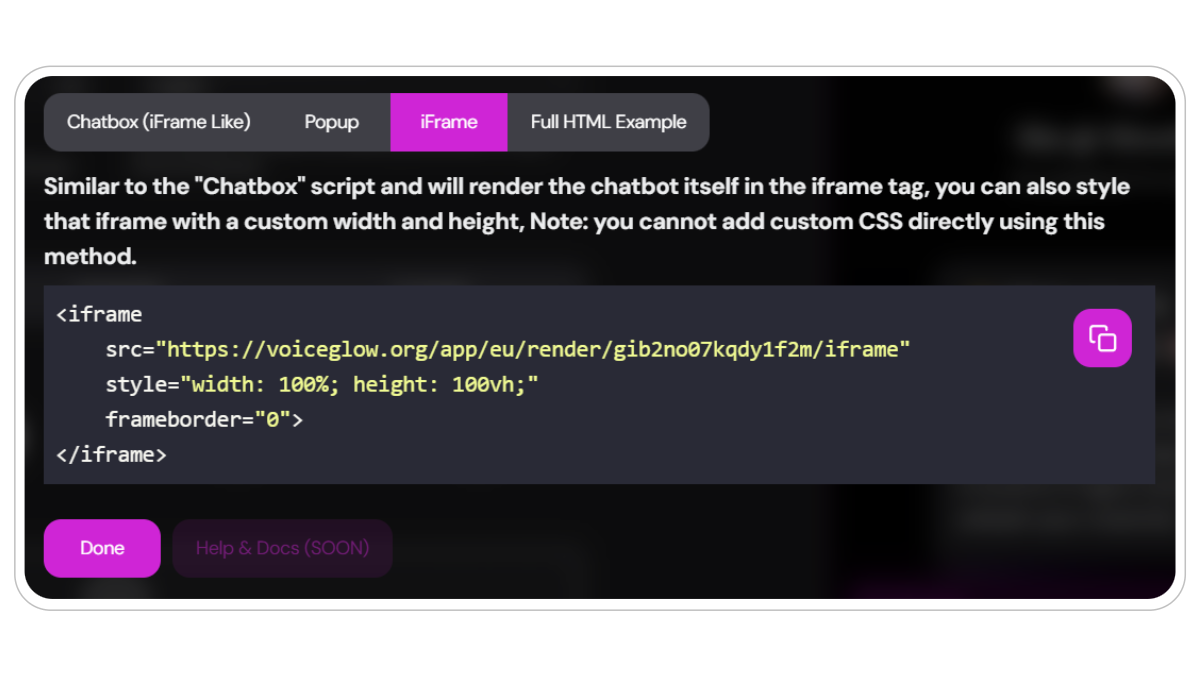
3. Copy the iframe code snippet located beneath `iframe`
 {" "}
Decide where and how you want to embed your agent **(e.g., website, platform,
shareable link)**.
Insert the iframe code into your chosen location. Here's a basic example:
```html theme={null}
```
Replace `YOUR_AGENT_ID` with your actual Convocore Agent ID.
Adjust the iframe's `width`, `height`, and other attributes to fit your specific use case.
We like to set the `border radius` to the same as your agent as this makes for a more complete style.
```html theme={null}
```
**This is the iframe above:**
## While youre learning about earth, listen to some house tunes (cause why not):
## Advanced Integration Ideas
Use CSS media queries to adjust the iframe's size based on screen
dimensions, ensuring a good experience on all devices.
Implement the iframe within a modal for a pop-up experience that doesn't
require constant screen real estate.
Create a dashboard with multiple iframes, each representing a different
specialized agent.
Embed agent iframes on product pages to provide instant, AI-powered product
information and support.
## Best Practices
* Ensure your agent's responses are tailored to the context in which the
iframe is used. - Regularly update your agent's knowledge base to keep
information current. - Monitor user interactions to continually improve your
agent's performance. - Consider implementing a feedback mechanism within the
iframe to gather user input.
## Conclusion
Iframe integration opens up a world of possibilities for Convocore. By thinking creatively and leveraging the flexibility of iframes, you can create unique, engaging, and highly functional AI-powered experiences across various platforms and use cases.
{" "}
Decide where and how you want to embed your agent **(e.g., website, platform,
shareable link)**.
Insert the iframe code into your chosen location. Here's a basic example:
```html theme={null}
```
Replace `YOUR_AGENT_ID` with your actual Convocore Agent ID.
Adjust the iframe's `width`, `height`, and other attributes to fit your specific use case.
We like to set the `border radius` to the same as your agent as this makes for a more complete style.
```html theme={null}
```
**This is the iframe above:**
## While youre learning about earth, listen to some house tunes (cause why not):
## Advanced Integration Ideas
Use CSS media queries to adjust the iframe's size based on screen
dimensions, ensuring a good experience on all devices.
Implement the iframe within a modal for a pop-up experience that doesn't
require constant screen real estate.
Create a dashboard with multiple iframes, each representing a different
specialized agent.
Embed agent iframes on product pages to provide instant, AI-powered product
information and support.
## Best Practices
* Ensure your agent's responses are tailored to the context in which the
iframe is used. - Regularly update your agent's knowledge base to keep
information current. - Monitor user interactions to continually improve your
agent's performance. - Consider implementing a feedback mechanism within the
iframe to gather user input.
## Conclusion
Iframe integration opens up a world of possibilities for Convocore. By thinking creatively and leveraging the flexibility of iframes, you can create unique, engaging, and highly functional AI-powered experiences across various platforms and use cases.