> ## Documentation Index
> Fetch the complete documentation index at: https://docs.convocore.ai/llms.txt
> Use this file to discover all available pages before exploring further.
# Agent Tester
> Automatically test your AI agents with AI-driven conversations
# Agent Tester
The Agent Tester is a powerful feature that allows you to automatically test your AI agents using AI-driven conversations. Instead of manually testing your agent, the tester simulates realistic customer interactions and provides comprehensive analysis of your agent's performance.
The Agent Tester uses AI to generate realistic customer messages, simulating real-world interactions to thoroughly evaluate your agent's capabilities.
## Getting Started
Navigate to your agent's **Tester** tab from the agent dashboard. You'll see the test configuration panel on the left and the test results on the right.
## Test Configuration
### Test Mode
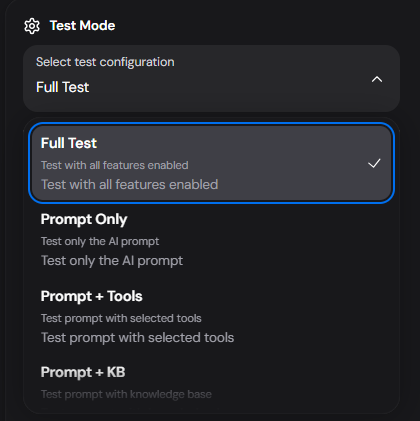
Select the type of test you want to run based on what you want to evaluate:
 | Mode | Description |
| ------------------ | ------------------------------------------------------------------- |
| **Full Test** | Test with all features enabled - prompts, tools, and knowledge base |
| **Prompt Only** | Test only the AI prompt without tools or KB |
| **Prompt + Tools** | Test the prompt with selected tools enabled |
| **Prompt + KB** | Test the prompt with knowledge base enabled |
Use **Full Test** for comprehensive evaluation, or use specific modes to isolate and debug particular aspects of your agent.
### Tools Configuration
When testing with tools, you can select which tools to include in the test:
| Mode | Description |
| ------------------ | ------------------------------------------------------------------- |
| **Full Test** | Test with all features enabled - prompts, tools, and knowledge base |
| **Prompt Only** | Test only the AI prompt without tools or KB |
| **Prompt + Tools** | Test the prompt with selected tools enabled |
| **Prompt + KB** | Test the prompt with knowledge base enabled |
Use **Full Test** for comprehensive evaluation, or use specific modes to isolate and debug particular aspects of your agent.
### Tools Configuration
When testing with tools, you can select which tools to include in the test:
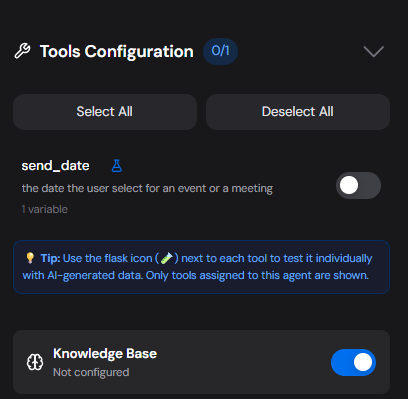 * **Select All / Deselect All**: Quickly toggle all tools
* **Individual Tool Toggle**: Enable/disable specific tools for targeted testing
* **Flask Icon (🧪)**: Click to test a tool individually with AI-generated data
* **Knowledge Base Toggle**: Enable or disable KB access during the test
Only tools assigned to the agent will appear in this list. Make sure to configure your agent's tools before testing.
### Test Scenarios
Provide context for what the test should focus on:
* **Select All / Deselect All**: Quickly toggle all tools
* **Individual Tool Toggle**: Enable/disable specific tools for targeted testing
* **Flask Icon (🧪)**: Click to test a tool individually with AI-generated data
* **Knowledge Base Toggle**: Enable or disable KB access during the test
Only tools assigned to the agent will appear in this list. Make sure to configure your agent's tools before testing.
### Test Scenarios
Provide context for what the test should focus on:
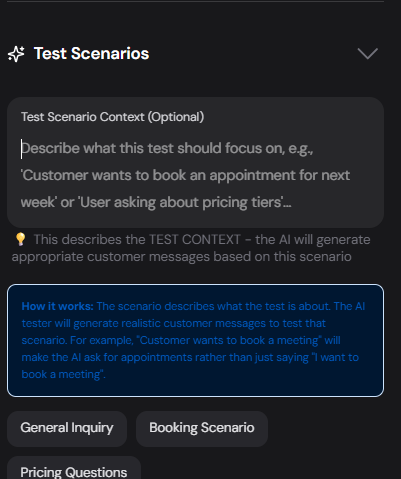 The **Test Scenario Context** field lets you describe what the test should focus on. The AI tester will generate appropriate customer messages based on this scenario.
**Example scenarios:**
* "Customer wants to book an appointment for next week"
* "User asking about pricing tiers"
* "Customer needs help with a product return"
**Quick Scenario Buttons:**
* **General Inquiry**: Basic questions about your service
* **Booking Scenario**: Test appointment/booking flows
* **Pricing Questions**: Test pricing-related conversations
The scenario describes what the test is about. For example, "Customer wants to book a meeting" will make the AI tester ask for appointments rather than just saying "I want to book a meeting".
### Conversation Length
Control how many exchanges the test will run:
The **Test Scenario Context** field lets you describe what the test should focus on. The AI tester will generate appropriate customer messages based on this scenario.
**Example scenarios:**
* "Customer wants to book an appointment for next week"
* "User asking about pricing tiers"
* "Customer needs help with a product return"
**Quick Scenario Buttons:**
* **General Inquiry**: Basic questions about your service
* **Booking Scenario**: Test appointment/booking flows
* **Pricing Questions**: Test pricing-related conversations
The scenario describes what the test is about. For example, "Customer wants to book a meeting" will make the AI tester ask for appointments rather than just saying "I want to book a meeting".
### Conversation Length
Control how many exchanges the test will run:
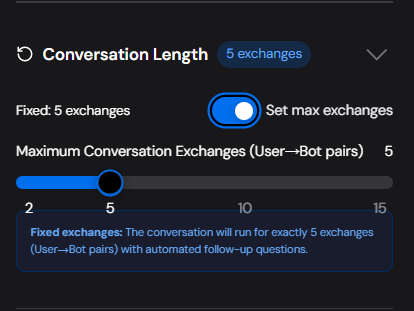 * **Fixed exchanges toggle**: When enabled, the conversation will run for exactly the specified number of exchanges
* **Maximum Conversation Exchanges**: Set between 2-15 exchanges (User→Bot pairs)
* **Slider**: Quickly adjust the conversation length
For thorough testing, we recommend at least **5 exchanges** to properly evaluate your agent's capabilities across multiple turns.
## Running a Test
1. Configure your test settings (mode, tools, scenario, length)
2. Click the **Run Test** button
3. Watch the conversation unfold in real-time in the logs
4. Review the comprehensive analysis when complete
## Test Results & Analysis
After the test completes, you'll receive a detailed analysis:
* **Fixed exchanges toggle**: When enabled, the conversation will run for exactly the specified number of exchanges
* **Maximum Conversation Exchanges**: Set between 2-15 exchanges (User→Bot pairs)
* **Slider**: Quickly adjust the conversation length
For thorough testing, we recommend at least **5 exchanges** to properly evaluate your agent's capabilities across multiple turns.
## Running a Test
1. Configure your test settings (mode, tools, scenario, length)
2. Click the **Run Test** button
3. Watch the conversation unfold in real-time in the logs
4. Review the comprehensive analysis when complete
## Test Results & Analysis
After the test completes, you'll receive a detailed analysis:
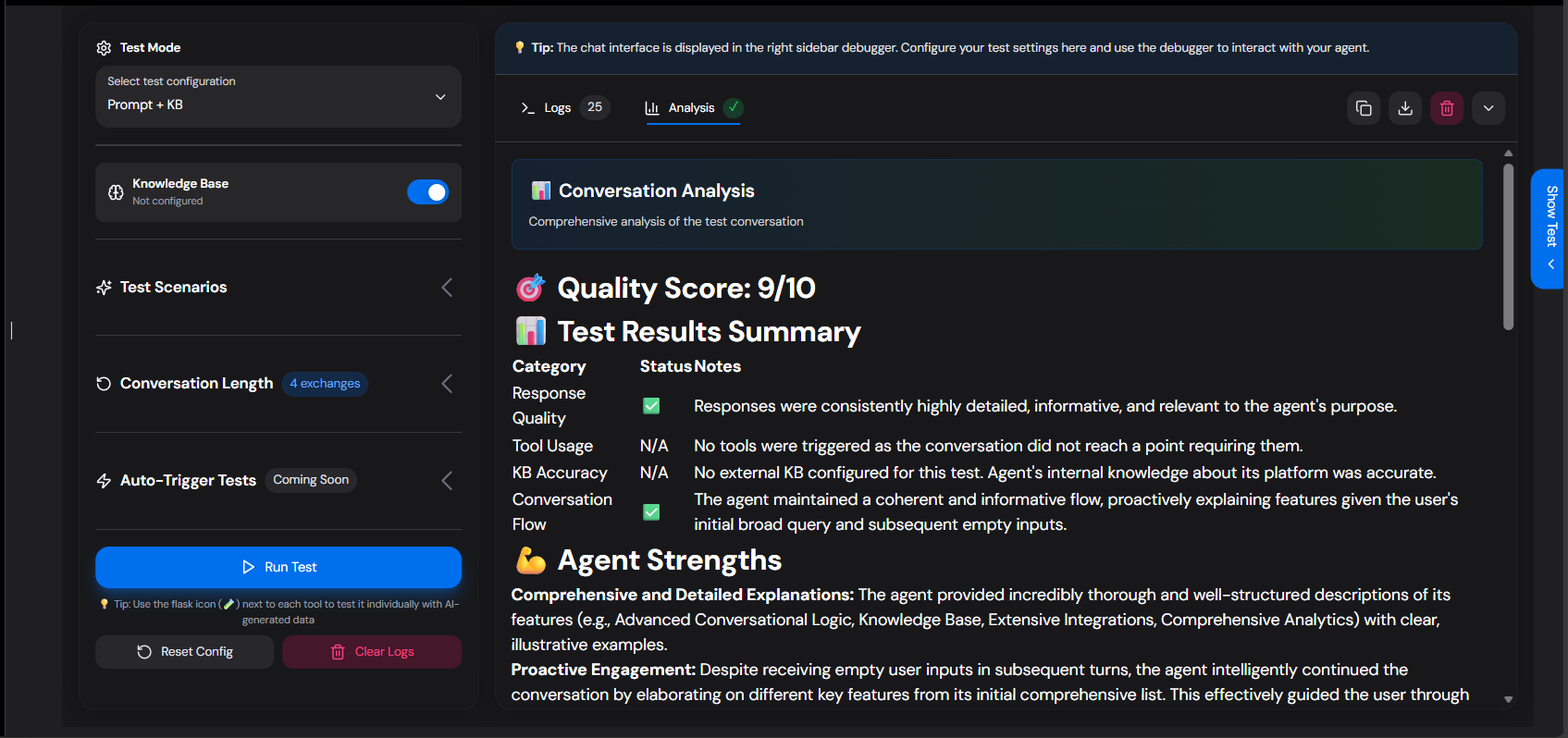 ### Quality Score
A score out of 10 indicating overall agent performance.
### Test Results Summary
| Category | Status | Description |
| ----------------- | ---------- | -------------------------------------- |
| Response Quality | ✅/⚠️/❌ | How well the agent responds |
| Tool Usage | ✅/⚠️/❌/N/A | Whether tools were triggered correctly |
| KB Accuracy | ✅/⚠️/❌/N/A | Knowledge base retrieval accuracy |
| Conversation Flow | ✅/⚠️/❌ | Natural conversation progression |
### Analysis Sections
* **Agent Strengths**: What your agent does well
* **Areas for Improvement**: Specific recommendations
* **Tools/Capabilities Analysis**: How tools were used
* **Knowledge Base Analysis**: KB retrieval performance
* **Customer Journey**: End-to-end experience assessment
* **Recommendations**: Actionable improvement suggestions
* **Final Verdict**: Executive summary
## Viewing Logs
Click on **Logs** tab to see the detailed conversation:
* **Sent messages**: What the AI tester sent to your agent
* **Received messages**: Your agent's responses
* **Info messages**: System events and status updates
* **Error messages**: Any issues that occurred
## Tips for Effective Testing
The more specific your test scenario, the more realistic and useful the test will be.
Run multiple tests with different modes to isolate issues.
If testing tools, verify they were actually triggered in the logs.
Pay attention to the Customer Journey section for UX insights.
## Credit Usage
The Agent Tester consumes credits based on actual token usage, using the same pricing as the gemini-2.5-flash model. Credits are charged at the end of each test session.
The credit calculation includes:
* Tokens used for generating test prompts
* Tokens used for follow-up questions
* Tokens used for the final analysis
## Troubleshooting
If your test ends before the configured number of exchanges, check if:
* Your agent's response triggered a natural conversation end
* There was a timeout (agent didn't respond within 30 seconds)
* An error occurred during the test
Ensure you've:
* Selected the tools in the Tools Configuration
* Used a test scenario that would naturally require the tool
* Configured the tool correctly in your agent
Review the analysis for specific recommendations. Common issues include:
* Vague or generic responses
* Not using available tools when appropriate
* Poor conversation flow or context retention
## Related Features
Learn how to create and configure tools for your agents.
Set up a knowledge base for your agent.
Build complex conversation flows with the visual canvas.
Track your agent's performance over time.
### Quality Score
A score out of 10 indicating overall agent performance.
### Test Results Summary
| Category | Status | Description |
| ----------------- | ---------- | -------------------------------------- |
| Response Quality | ✅/⚠️/❌ | How well the agent responds |
| Tool Usage | ✅/⚠️/❌/N/A | Whether tools were triggered correctly |
| KB Accuracy | ✅/⚠️/❌/N/A | Knowledge base retrieval accuracy |
| Conversation Flow | ✅/⚠️/❌ | Natural conversation progression |
### Analysis Sections
* **Agent Strengths**: What your agent does well
* **Areas for Improvement**: Specific recommendations
* **Tools/Capabilities Analysis**: How tools were used
* **Knowledge Base Analysis**: KB retrieval performance
* **Customer Journey**: End-to-end experience assessment
* **Recommendations**: Actionable improvement suggestions
* **Final Verdict**: Executive summary
## Viewing Logs
Click on **Logs** tab to see the detailed conversation:
* **Sent messages**: What the AI tester sent to your agent
* **Received messages**: Your agent's responses
* **Info messages**: System events and status updates
* **Error messages**: Any issues that occurred
## Tips for Effective Testing
The more specific your test scenario, the more realistic and useful the test will be.
Run multiple tests with different modes to isolate issues.
If testing tools, verify they were actually triggered in the logs.
Pay attention to the Customer Journey section for UX insights.
## Credit Usage
The Agent Tester consumes credits based on actual token usage, using the same pricing as the gemini-2.5-flash model. Credits are charged at the end of each test session.
The credit calculation includes:
* Tokens used for generating test prompts
* Tokens used for follow-up questions
* Tokens used for the final analysis
## Troubleshooting
If your test ends before the configured number of exchanges, check if:
* Your agent's response triggered a natural conversation end
* There was a timeout (agent didn't respond within 30 seconds)
* An error occurred during the test
Ensure you've:
* Selected the tools in the Tools Configuration
* Used a test scenario that would naturally require the tool
* Configured the tool correctly in your agent
Review the analysis for specific recommendations. Common issues include:
* Vague or generic responses
* Not using available tools when appropriate
* Poor conversation flow or context retention
## Related Features
Learn how to create and configure tools for your agents.
Set up a knowledge base for your agent.
Build complex conversation flows with the visual canvas.
Track your agent's performance over time.