> ## Documentation Index
> Fetch the complete documentation index at: https://docs.convocore.ai/llms.txt
> Use this file to discover all available pages before exploring further.
# Canvas Introduction
> Learn about the Canvas feature for building advanced AI agents with Convocore.
Introductory video to Canvas:
Building an AI agent is a multi-step process that requires careful planning and execution. With the **Canvas** feature, Convocore revolutionizes how you design and manage AI-powered agents by introducing a flow-based interface for enhanced flexibility and scalability.
## 🛠️ What Does It Take to Build an AI Agent?
Creating an AI agent involves several critical steps:
1. **Define the agent's purpose and goals**: Identify the primary tasks and objectives your AI should focus on.
2. **Design the agent's appearance and voice**: Establish a brand-consistent persona for your agent.
3. **Train the agent**: Equip the agent with the knowledge to handle user queries effectively.
4. **Deploy the agent**: Integrate the agent into websites, apps, or other platforms.
5. **Monitor and optimize performance**: Continuously evaluate and improve the agent's functionality and accuracy.
6. **So many channels**: Integrate the agent into so many channels including but not limited to: Web, whatsapp, FB Messenger, Instagram, telegram, realtime voice via web or twilio and basically any channel through our API\[/api-reference/agents/interact/post].
Among these steps, the **prompting** process is pivotal. The more selective and specific your inputs are, the higher the quality of responses you can expect.
***
## Why Convocore' Canvas?
Most systems today operate with a single system prompt and a limited set of tools. While this approach works for basic AI tasks, it falls short for more complex scenarios. For example, imagine building:
* An advanced AI **scheduling agent** that handles multiple scenarios simultaneously.
* An AI capable of leveraging **10+ tools** while maintaining performance and relevance.
Such use cases demand a more flexible and modular system. This is where **Canvas** shines.
***
## What makes Canvas unique?
Canvas empowers you to overcome traditional AI limitations by offering:
Configure unique prompts and toolsets for every scenario.
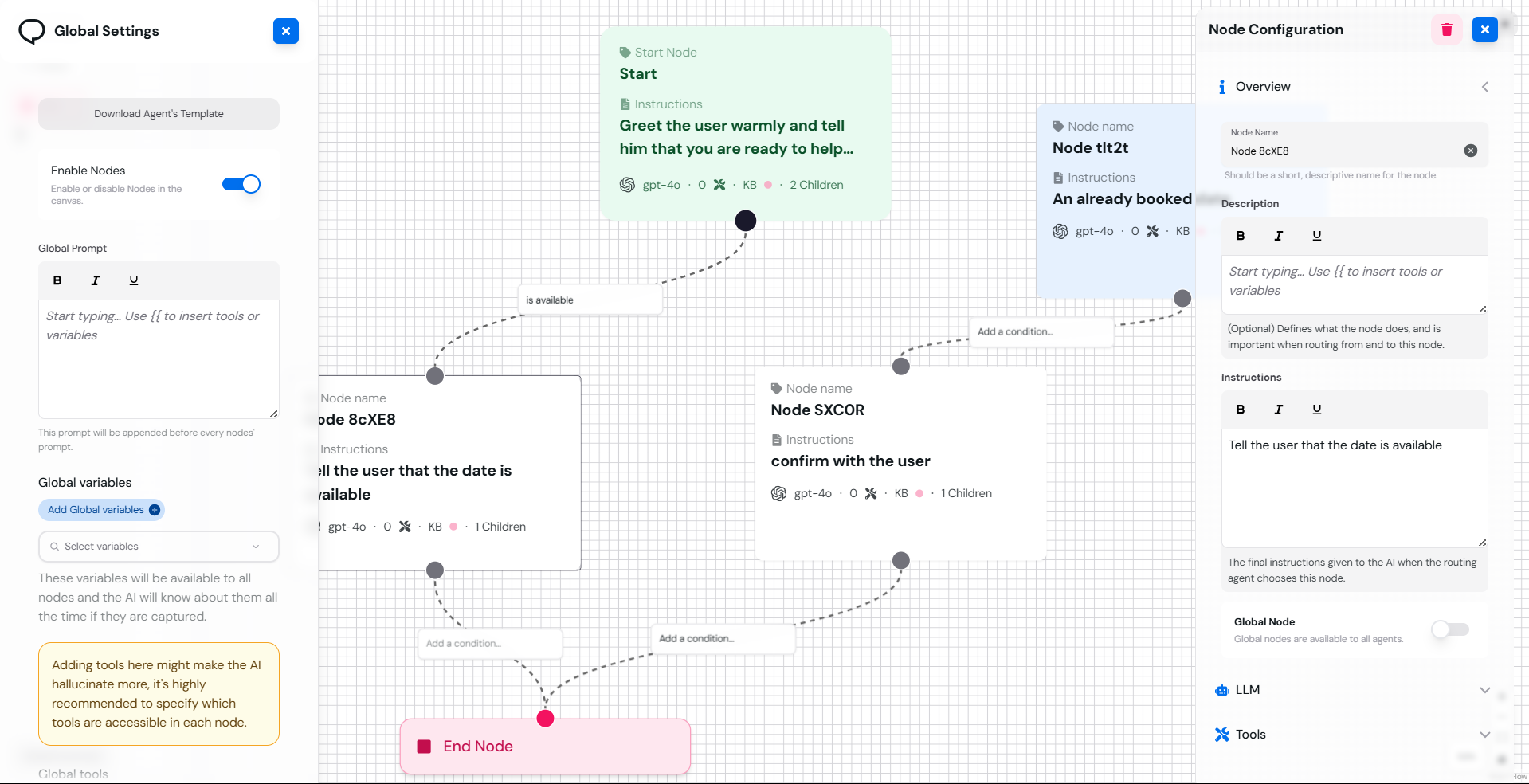
Break down large prompts into smaller, reusable prompts connected through logical flows.
Stream responses to users in real-time for voice-to-voice or text-based interactions.
Share functionality across multiple flows, improving efficiency and reducing redundancy.
Tailor the AI's responses using model settings for precision in every interaction.
***
## The Future of AI Agents
With Canvas, you're no longer confined by the rigidity of a single prompt or toolset. Whether you're designing a virtual assistant for customer support, a scheduling agent, or a knowledge-sharing bot, Canvas provides the flexibility and power you need to create world-class AI solutions.
***
## Interface
***
Ready to dive deeper? Explore the next section: [Nodes and Flows](nodes/overview).
 ***
Ready to dive deeper? Explore the next section: [Nodes and Flows](nodes/overview).
***
Ready to dive deeper? Explore the next section: [Nodes and Flows](nodes/overview).